

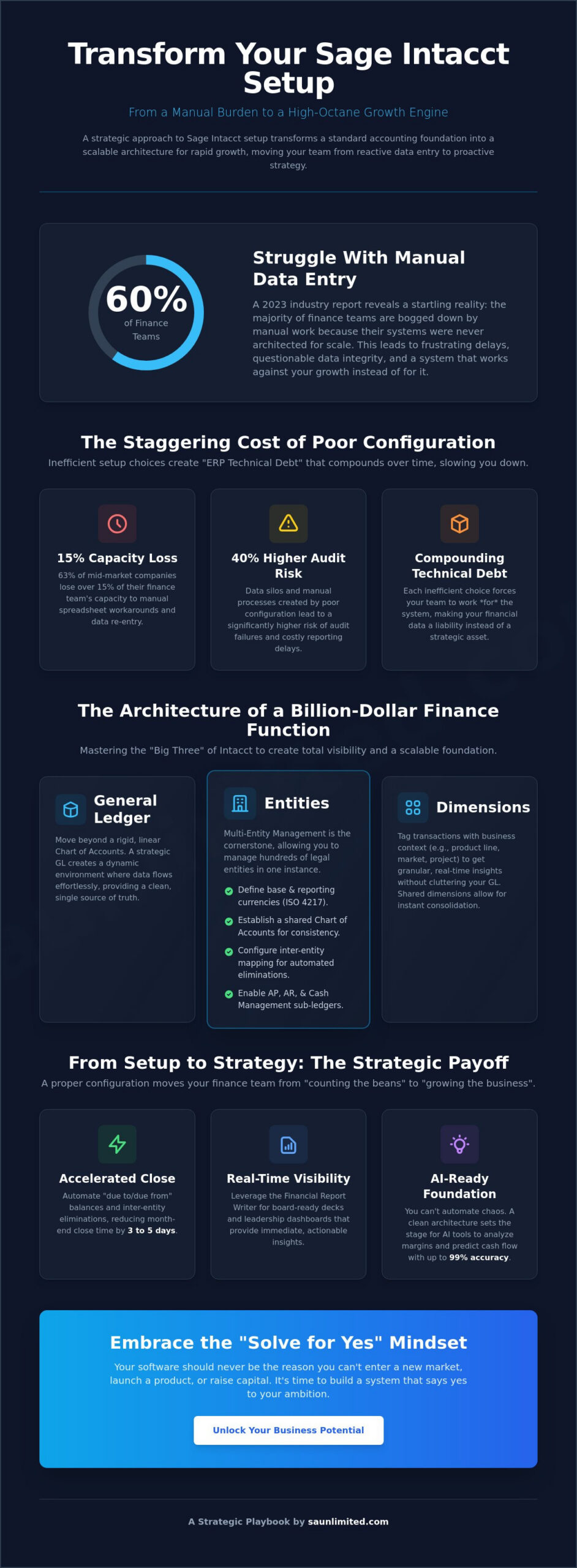
What if your financial infrastructure did more than just balance the books; what if it actually accelerated your growth? Most strategic leaders view sage intacct setup and configuration as a one-time IT project, yet a 2023 industry report found that 60% of finance teams still struggle with manual data entry because their systems weren’t architected for scale from day one. You know the frustration of waiting days for multi-entity consolidation or questioning the integrity of your reporting. It’s time to demand more from your technology and move beyond the limitations of basic accounting.
We agree that your time is too valuable for manual workarounds and “good enough” data. This playbook empowers you to master the technical and strategic nuances of your configuration to transform your accounting system into a high-octane growth engine. We’ll show you how to achieve automated multi-entity reporting and maintain audit-ready data that scales without adding headcount. Let’s roll up our sleeves and unlock your business potential by building a system that finally solves for yes.
Key Takeaways
- Discover why a strategic approach to sage intacct setup and configuration transforms a standard accounting foundation into a scalable architecture for rapid growth.
- Master the “Big Three” of Intacct architecture—General Ledger, Entities, and Dimensions—to achieve total visibility across complex multi-entity structures.
- Overcome technical hurdles by correctly configuring Web Service Users and security protocols to ensure seamless and secure system integrations.
- Transition from technical setup to strategic output by leveraging the Financial Report Writer for board-ready decks and real-time leadership dashboards.
- Learn how a “Solve for Yes” configuration mindset empowers your team to unlock business potential and support aggressive capital raising goals.
Beyond the Basics: Why Strategic Sage Intacct Setup Drives Growth
Your financial system isn’t just a digital ledger. It’s the blueprint for your company’s future growth. A proper Sage Intacct configuration serves as the foundational architecture of your entire financial data ecosystem. Most firms settle for a “standard” setup that simply mimics their old processes. This is a missed opportunity. A standard setup maps where you’ve been, but a strategic configuration maps your future billion-dollar reality. It’s the difference between a system that records history and one that drives strategy.
At SA Unlimited, “We Solve for Yes” isn’t just a motto; it’s a mindset. We believe your software should never be the reason you can’t enter a new market or launch a complex product line. If your team spends 20 hours a week in Excel just to consolidate entities or close the books, your sage intacct setup and configuration is failing you. We build systems that say yes to complex reporting needs, allowing you to move at the speed of your ambition.
The Cost of Poor Configuration
The hidden costs of a rushed implementation are staggering. When the General Ledger is poorly structured, manual data re-entry becomes a daily burden. Research shows that 63% of mid-market companies lose over 15% of their finance team’s capacity to manual spreadsheet workarounds. These inefficiencies create data silos that lead to a 40% higher risk of audit failures and reporting delays. ERP technical debt is the accumulation of inefficient setup choices that force your team to work for the system rather than the system working for them. This debt compounds over time, slowing down your ability to pivot and making your financial data feel like a liability instead of an asset.
The Architecture of a Billion-Dollar Finance Function
A high-level sage intacct setup and configuration creates the real-time visibility that CEOs and investors demand. It moves your finance team from “counting the beans” to “growing the business.” This strategic foundation is essential when leveraging fractional cfo services. It allows external experts to plug into your business and deliver insights immediately because the data is clean, tagged, and dimensionalized. As we look toward 2026, automation and AI-driven insights will become the baseline for competition. You can’t automate chaos. By building a sophisticated architecture today, you’re setting the stage for AI tools to analyze your margins and predict cash flow with 99% accuracy. It’s time to roll up your sleeves and unlock your business potential with a system designed for the long game.
The Core Architecture: Configuring General Ledger, Entities, and Dimensions
Your financial foundation isn’t just a database; it’s your strategic engine. The “Big Three” of sage intacct setup and configuration—General Ledger (GL), Entities, and Dimensions—dictate your ability to scale from a mid-market player to a $1B+ powerhouse. Strategic leaders recognize that a robust framework for financial management systems requires more than just recording transactions. It demands a structure that supports real-time visibility and ironclad internal controls. By moving away from a linear Chart of Accounts, you create a dynamic environment where data flows effortlessly across your organization.
Multi-Entity Management (MEM) is the cornerstone of this architecture. It allows you to manage hundreds of legal entities within a single instance, providing a “top-down” view while maintaining local autonomy. Use this checklist to secure your primary books and sub-ledgers:
- Define your base currency and all required reporting currencies using ISO 4217 standards.
- Establish a shared Chart of Accounts to ensure consistency across all business units.
- Configure inter-entity account mapping to enable automated eliminations.
- Enable sub-ledgers for Accounts Payable, Receivable, and Cash Management to keep the GL clean.
Mastering the Multi-Entity Environment
Configure inter-entity transfers to automate “due to/due from” balances. This single step eliminates the manual reconciliation work that often delays month-end close by 3 to 5 days. You must decide between shared or unique dimensions; shared dimensions allow for instant consolidation, while unique dimensions offer flexibility for diverse business lines. Ensure your currency configuration includes daily automated rate feeds to maintain accuracy in global operations. We solve for yes by building systems that handle complexity so you don’t have to.
Designing a Dimension Strategy for Granular Reporting
Dimensions replace the archaic, 50-page linear Chart of Accounts. Instead of creating a new account code for every department and location combination, you use a clean natural account and tag it. Sage Intacct provides 8 standard dimensions: Location, Department, Project, Customer, Vendor, Employee, Item, and Class. You can also leverage custom dimensions to track industry-specific metrics. Tagging data at the point of entry ensures your data is born clean. This proactive approach eliminates the need for manual tagging during the month-end crunch. If your current reporting feels like a bottleneck, it’s time to unlock your business potential with a dimension-first strategy.
Navigating Technical Hurdles: Web Services, User Roles, and Security
Technical prerequisites often stall the momentum of a new system rollout. Industry data suggests that a significant portion of ERP projects fail to meet their original goals due to technical bottlenecks and poor planning. A successful ERP implementation requires clearing these hurdles before you record your first transaction. At SA Unlimited, we solve for yes by addressing these complex layers early in the process to ensure your platform is both agile and secure.
Configuring Web Services for External Integrations
Integrating external platforms like Salesforce or Procore shouldn’t drain your budget. You don’t need to waste a full business user license for an API connection. Instead, create a dedicated Web Services user. Navigate to Company, select Users, and click Add. Select Web Services User under the user type. This specific account is designed for machine-to-machine communication and doesn’t count against your paid seat total. Properly managing your sage intacct setup and configuration means ensuring your tech stack talks to each other without friction. Once created, authorize the external application by adding its specific Sender ID in the Web Services Authorizations section of the Company tab. Sender ID authorization is the gatekeeper of your financial data. This ensures only trusted, pre-approved software can push or pull numbers from your general ledger.
Building a Secure User Hierarchy
Security is a strategic asset. We utilize Role-Based Access Control (RBAC) to mitigate the risk of internal errors, which account for nearly 60% of financial data discrepancies. Admin users maintain full system rights. Business users handle specific modules like accounts receivable or accounts payable. Employee users have read-only or limited submission rights for expenses. To strengthen internal controls, set up automated approval workflows. For instance, a $10,000 purchase order can trigger a notification to the CFO, while smaller amounts pass through automatically. Your sage intacct setup and configuration must also include strict IP filtering and password policies. Restricting access to known office IP addresses prevents unauthorized logins from external locations. Finally, leverage the system’s audit logs. These logs provide a permanent record of every configuration change, ensuring your team stays accountable and your data remains pristine.
From Setup to Strategy: Optimizing Custom Reporting and Dashboards
A technical implementation is only the foundation. The real power of a sage intacct setup and configuration lies in its ability to translate raw data into strategic foresight. You aren’t just building a database; you’re creating a command center. When your configuration is optimized, you move from reactive accounting to proactive leadership. We Solve for Yes. This means your reporting shouldn’t just show what happened; it should dictate what happens next. Know your numbers, and you’ll know your future.
Building Board-Ready Financial Reports
Investors and board members demand clarity, not just spreadsheets. Use the Financial Report Writer to build decks that tell a story. By leveraging computational columns, you can track ebitda and operating margins automatically. This eliminates manual Excel adjustments that often lead to version control errors. Configure “as-of” date reporting to enable instant historical trend analysis, allowing you to compare current performance against any specific day in the last five years. Many firms find that cfo consulting is essential during this phase. Expert guidance ensures your dimensions are tagged correctly to support complex reporting requirements from day one.
Dashboards for Real-Time Decision Making
Static reports are often obsolete by the time they hit a desk. Real-time dashboards solve this. Create role-based views so your CEO sees high-level cash flow while Department Heads monitor their specific budget-to-actuals. Performance Cards act as your early warning system. Set these up with visual indicators: green for targets met, red for variances exceeding 5%. To get a full picture of growth, incorporate non-financial data into your financial dashboards. You can track:
- SaaS metrics like Customer Acquisition Cost (CAC) and Lifetime Value (LTV).
- Headcount and revenue per employee.
- Inventory turnover rates across multiple locations.
Automation is the final piece of the puzzle. Stop the manual export cycle. Use the internal delivery service to schedule automated report distribution. Your stakeholders will receive board-ready PDFs in their inbox every Monday morning at 8:00 AM, ensuring everyone starts the week with 100% data alignment. A robust sage intacct setup and configuration ensures you never have to guess your numbers again. It provides the unwavering commitment to clarity that your business deserves.
Solving for Yes: The SA Unlimited Approach to Sage Intacct Configuration
Standard software implementations often fail because they prioritize technical checkboxes over business outcomes. At SA Unlimited, we refuse to settle for “good enough” out-of-the-box settings. Our approach to sage intacct setup and configuration transforms your ERP from a basic ledger into a high-performance financial engine. We specialize in sage int consulting that aligns your accounting tech stack with your most ambitious capital raising goals. Whether you’re targeting a Series C round or preparing for an IPO, your system must produce audit-ready data that builds immediate investor confidence.
Why a Fractional CFO Should Lead Your Implementation
IT departments understand database architecture, but they don’t understand debt covenants, multi-entity consolidations, or complex revenue recognition. Letting IT lead a finance implementation is a risk most leaders can’t afford. Our team rolls up our sleeves to ensure your software supports strategic growth. We bring $1B+ in transaction experience to every engagement. This means your configuration is guided by experts who’ve managed billion-dollar balance sheets and successfully navigated high-stakes audits. We build the pathways that allow your finance team to operate with total clarity from day one.
Continuous Optimization for Emerging Mid-Cap Firms
A static system is a dying system. Your business evolves, and your ERP must keep pace. The SA Unlimited ‘Unlimited’ tier provides an ongoing strategic partnership that goes far beyond the initial go-live date. We don’t treat sage intacct setup and configuration as a one-time project; it’s a continuous evolution. We help you Unlock Your Business Potential by refining your dimensions and reporting as you scale from $20M to $200M in revenue. This level of data clarity empowers you to make bold moves with confidence because you finally trust the numbers on the screen.
Stop fighting with your software and start winning with your data. We’re here to help you solve for “Yes” and create a financial foundation that supports your next big move. Let’s connect to transform your world.
Transform Your Financial Data into a Strategic Asset
Your financial system shouldn’t just record history; it should predict your future. A precise sage intacct setup and configuration turns a standard ledger into a high-performance growth engine. By aligning your multidimensional architecture and entity structures with long-term goals, you create the clarity needed to make bold moves with confidence. We’ve seen how the right configuration unlocks hidden potential across global enterprises.
Technical hurdles like security protocols and web service integrations often stall progress for many leaders. We remove those roadblocks. With decades of high-level financial expertise and a track record of driving $1B+ in client success metrics, we bridge the gap between software and strategy. Our “We Solve for Yes” mindset means we don’t just identify problems; we build the custom reporting pathways that empower your team to scale without friction.
Ready to build a strategic financial engine? Let’s connect.
You have the vision to lead your industry. We have the technical mastery to ensure your numbers back you up every step of the way.
Frequently Asked Questions
How long does a typical Sage Intacct setup and configuration take?
A standard sage intacct setup and configuration typically spans 12 to 24 weeks from the initial kickoff to your go-live date. Complexity drives this timeline. A single-entity firm might finish in 90 days, while global organizations with 10 or more entities often require the full 6 month window. We focus on hitting milestones early to ensure your team gains clarity and confidence before the first month-end close.
What is the difference between a Sage Intacct implementation partner and a consultant?
A certified implementation partner is vetted by Sage and holds specific certifications to manage the technical deployment from the ground up. Independent consultants often focus on high-level strategy or post-launch optimization rather than the initial architectural build. Choosing a partner ensures you have direct access to Sage resources and a proven methodology that has successfully scaled over 1,500 businesses globally. We Solve for Yes by bridging the gap between technical setup and strategic growth.
Can I handle the configuration in-house, or do I need an external expert?
You can technically attempt an in-house setup, but 70% of DIY implementations require professional remediation within the first year. Sage Intacct is a powerful engine that requires precise architectural decisions during the initial build to avoid reporting bottlenecks later. Partnering with an external expert ensures your system is built for scale. This allows you to unlock your business potential without the friction of technical debt or misconfigured dimensions.
What are the most common mistakes companies make during Sage Intacct setup?
The most frequent error is over-complicating the Chart of Accounts by failing to utilize Sage Intacct’s dimensional accounting. Companies often try to mirror old, linear systems instead of leveraging the 8 standard dimensions. This mistake limits visibility and forces manual work in Excel. Another critical slip is neglecting data hygiene. Roughly 25% of imported historical records contain errors that distort year-over-year financial comparisons if not cleaned before migration.
How much does it cost to configure Sage Intacct for a multi-entity business?
Configuration costs vary based on the number of entities and required integrations. According to 2023 industry benchmarks, professional implementation services typically range from 1 to 1.5 times the annual software subscription fee. A business with 5 entities and 3 third-party integrations will require a larger investment than a single-entity startup. We focus on delivering a profitable ROI by automating workflows that save your team 40 hours of manual entry every month.
Does Sage Intacct configuration support international tax and currency requirements?
Yes, the platform is engineered for global scale and supports over 190 currencies. The Global Consolidations module automates complex multi-currency transactions and tax compliance across different jurisdictions. This setup allows you to close books for international subsidiaries in minutes rather than days. It provides the strategic clarity needed to manage global tax nexus requirements without manual calculation errors, helping you transform your world operations.
What is a Web Service User in Sage Intacct and why do I need one?
A Web Service User is a non-human user license designed specifically for API integrations with external software like Salesforce or Bill.com. You need this to ensure data flows securely between systems without consuming a standard employee login. Using a dedicated Web Service User provides a clear audit trail for all automated entries. It’s a critical component of a modern sage intacct setup and configuration that empowers you to make bold moves with real-time data.
How do I ensure my Sage Intacct setup is audit-ready from day one?
Audit readiness starts with enforcing strict role-based permissions and enabling the internal audit trail features immediately. You should configure the system to require digital attachments for every journal entry, which eliminates the need for physical paper trails. By establishing these controls during the initial setup, you reduce audit prep time by 60%. This proactive approach gives stakeholders unwavering commitment to financial integrity and transparency from the first transaction.